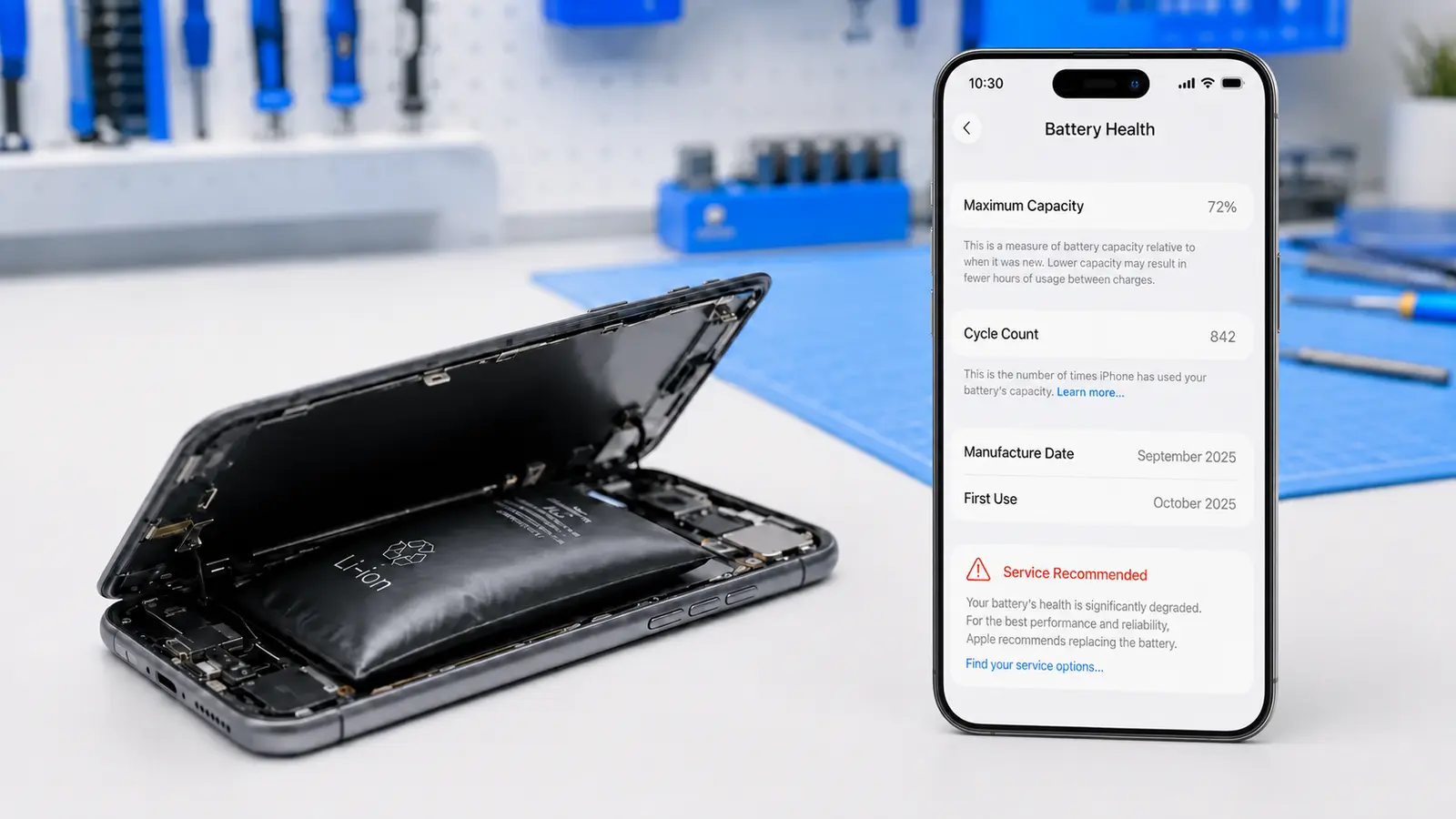
Not sure if it’s time for a new battery? The clearest signs your phone battery needs replacing are a charge that doesn’t last the day, random shutdowns even when the screen shows battery left, slow or unreliable charging, and a back panel that feels swollen or bulged. None of these mean you need a whole new phone — in almost every case, swapping the battery brings your phone right back to normal, usually the same day.
1. 5 Signs Your Phone Battery Needs Replacing
A phone battery rarely fails all at once — it wears down gradually, and the symptoms show up in a few predictable ways. Here are the five signs your phone battery needs replacing that come up most often.
1.1 Your Battery Drains Much Faster Than It Used To
If a full charge used to get you through the day and now barely lasts until lunch, that’s usually battery wear, not a rogue app. Lithium-ion batteries lose capacity every charge cycle — it’s expected after a couple of years of daily use.
1.2 Your Phone Shuts Off Randomly, Even With Charge Left
This is one of the more urgent signs your phone battery needs replacing. A worn battery can’t deliver stable power under load, so the phone shuts down to protect itself even though the screen shows 20-30% remaining.
1.3 Charging Is Slow, Unreliable, or Stops and Starts
If your phone charges in fits and starts, takes far longer than it used to, or stops charging before it reaches 100%, the battery — not the charging cable — is the more likely cause once you’ve ruled out a damaged cable or port.
1.4 The Back of the Phone Feels Swollen or Won’t Sit Flat
A phone that rocks on a flat table, has a lifted screen edge, or feels puffy on the back has a swollen battery. This is a safety issue, not just an inconvenience — stop using the phone and get it checked as soon as possible.
1.5 The Phone Feels Warm Even When Idle
Batteries that are breaking down can run hotter than normal, even when you’re not actively using the phone. If it feels warm sitting untouched in your pocket, it’s worth a diagnostic.
2. Why Phone Batteries Wear Out
Every phone battery is rated for a limited number of charge cycles — typically a few hundred to around a thousand full cycles before capacity drops noticeably. Heat, frequent fast charging, and letting the battery sit at 0% or 100% for long periods all speed up this wear. Once a battery has degraded past a certain point, no software update or settings change brings the lost capacity back — replacement is the only fix.
3. Is It the Battery or Something Else?
A quick way to check before booking a repair: open your phone’s battery health setting (Settings > Battery > Battery Health on iPhone, or Settings > Battery on most Android phones) and look at the “maximum capacity” or health percentage.
Anything meaningfully below 80% is one of the clearest signs your phone battery needs replacing. If the number looks fine but you’re still seeing shutdowns or swelling, get a free diagnostic — those are physical battery symptoms, not something a factory reset will fix.
4. Can You Slow Down Battery Wear?
You can’t stop a battery from aging, but a few habits slow it down: avoid leaving your phone at 0% or 100% for long stretches, keep it out of direct heat (like a hot car), and use fast charging sparingly rather than every time (see Consumer Reports’ guide on how to extend your phone’s battery life for more detail on why these habits help). None of this reverses damage that’s already been done — it only slows how fast a healthy battery wears out.
5. When Should You Get the Battery Replaced?
A professional inspection is especially worth getting when:
- Battery health has dropped below 80%
- The phone shuts down unexpectedly with charge remaining
- The back panel is swollen, bulging, or won’t sit flat
- Charging has become slow, inconsistent, or stops early
- The phone runs warm even when idle
Outcomes vary by device age and condition, but in most cases a battery replacement — not a new phone — solves the problem, and it’s a same-day repair.
6. Frequently Asked Questions
How do I know for sure if it’s the battery and not the phone itself?
Check your battery health percentage in Settings first. If it’s below 80%, or you’re seeing random shutdowns, swelling, or fast draining, it’s almost always the battery. A free diagnostic confirms it before any work is done.
Is it dangerous to keep using a phone with a swollen battery?
Yes — a swollen battery is a safety issue. Stop using the phone, avoid charging it further, and get it looked at as soon as possible.
How much does a phone battery replacement cost?
Phone battery replacements start around $49, with the exact price depending on your device model. See our phone repair prices page for current rates, or get an exact quote with a free diagnostic.
Can I replace the battery myself?
It’s possible on some models, but it involves opening a sealed device, handling a lithium-ion battery safely, and risks damaging the screen or water seal. Most customers find it’s not worth the risk or the cost of a mistake compared to a same-day professional replacement.
Not Sure If Your Battery Needs Replacing?
Tell us what your phone is doing — draining fast, shutting off, swollen, or charging strangely — and we can help you understand the most practical next step before you schedule a repair.
Ask Us About Your Device